
ARAC: room acoustics calculator for auditoriums
ARAC (Architectural Room Acoustic Calculator) was programmed by the Department of Environmental Architecture, Hanoi University of Civil Engineering, together with the Institute of Information Technology in Civil Engineering – RDSIC. It helps you calculate the acoustic design of auditoriums with sound-absorbing and sound-reflecting materials.
From plan and section drawings to the room's reverberation time
You enter distances measured on the drawings, the room volume, the seating capacity and the area of each finish. ARAC checks the delay and level of reflected sound at the listening points, then calculates reverberation time in six octave bands and compares it with the optimum for that type of room.
- Check the delay of sound reflected from the ceiling and both side walls
- Calculate reflected and total sound level at each listening point
- Calculate required and actual sound absorption
- Calculate reverberation time with the Eyring formula and plot it against the ±10% band
- Library of absorption coefficients for seats, curtains, carpets, ceilings, walls and absorbers
- Save every table as a project file to reopen and edit later
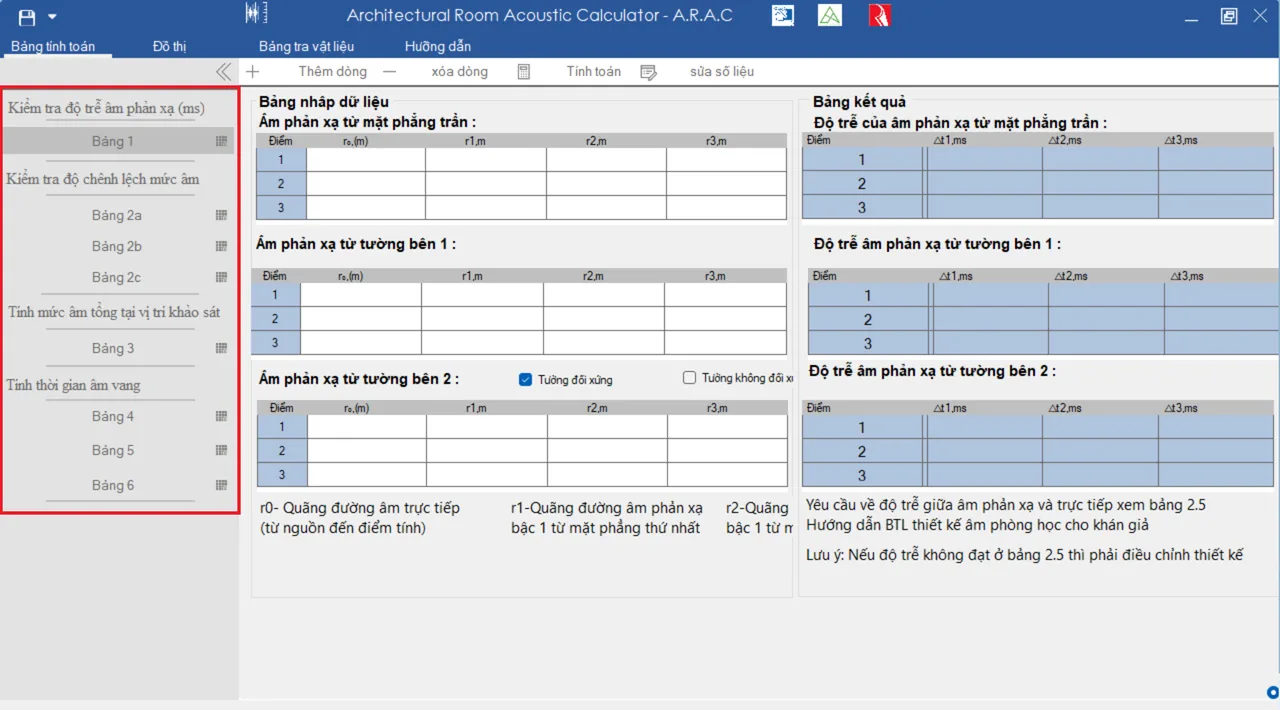
Six tables, worked through in order
Each table takes its inputs from the one before, so every value is entered once.
-
1
Reflection delay
From the direct path r₀ and reflected path r, delay Δt = (r − r₀) / 0.34 ms at each point.
-
2
Reflected sound level (2a, 2b, 2c)
Reflected level from the ceiling, side wall 1 and side wall 2, with the difference ΔL from direct sound.
-
3
Total sound level
Energy sum of direct and reflected sound: ΣL = 10·lg Σ100.1·Lᵢ.
-
4
Required absorption
From room function, volume V and optimum reverberation time: Areq = 0.164·V / Topt in each band.
-
5
Actual reverberation time
From the area and absorption of each surface, the audience and the air, T by the Eyring formula.
-
6
Reverberation vs occupancy
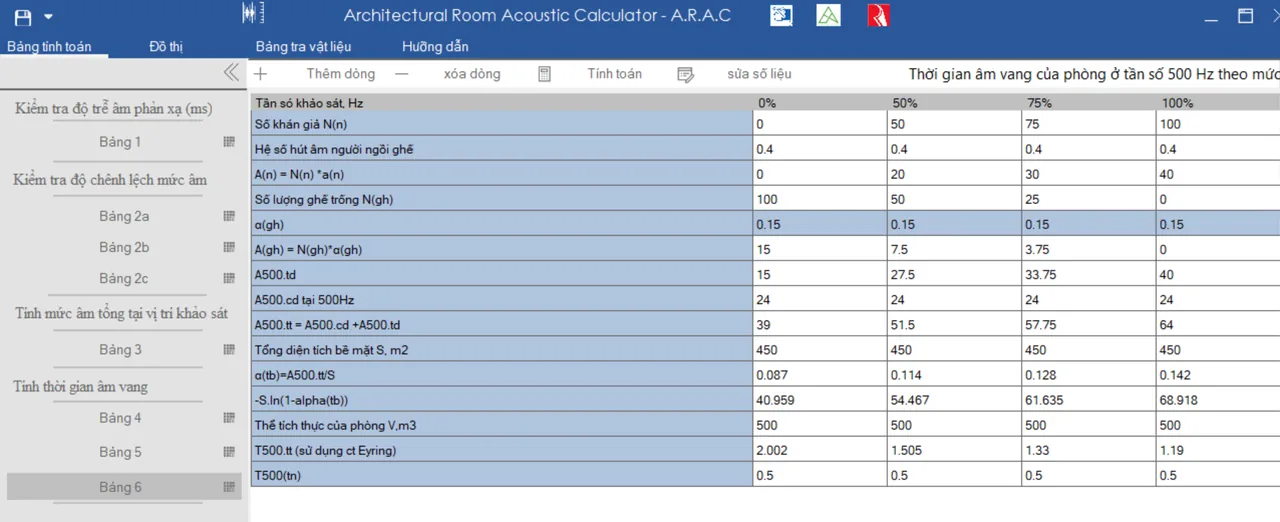
Reverberation time at 500 Hz with the room empty, 50%, 75% and fully occupied.
Using ARAC, step by step
1. Getting to know the window
Click Bảng tính toán (Calculation tables) to pick a table. The list collapses each time you choose one; click the double arrow at its top to open it again.
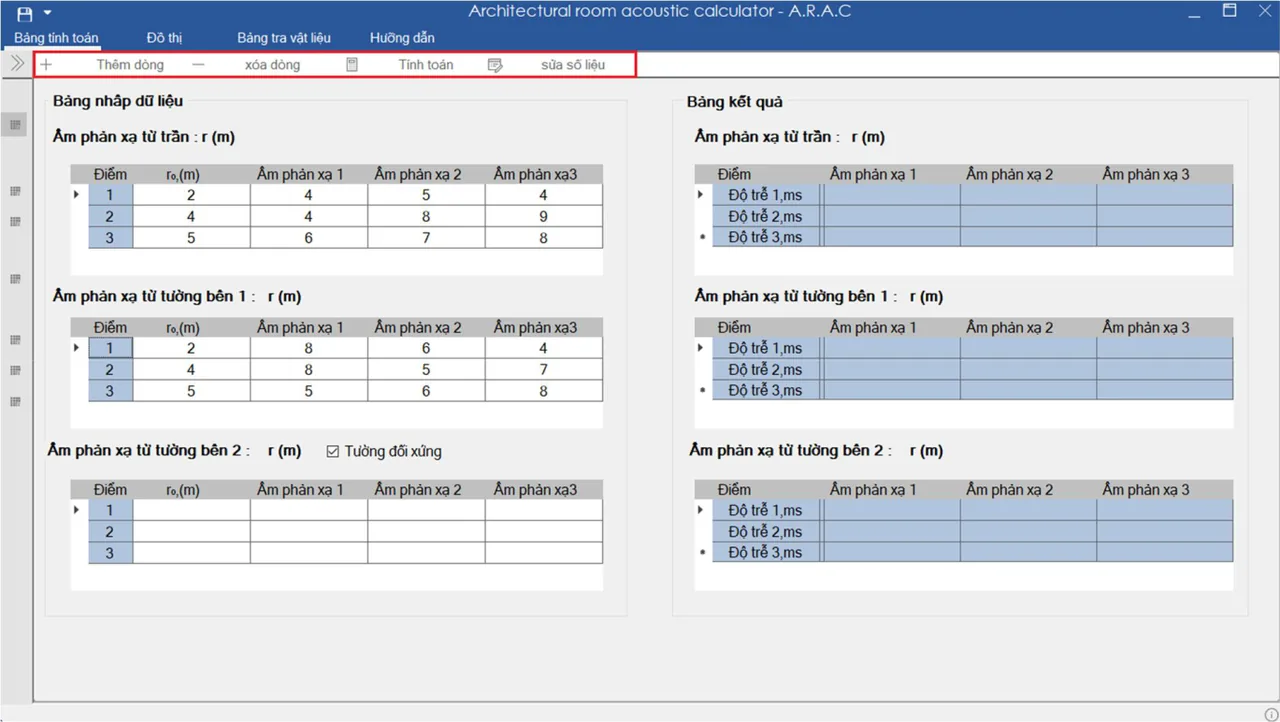
The toolbar has four buttons:
- Thêm dòng (Add row): adds a row when you need more than three data points.
- Xóa dòng (Delete row): removes the last row, down to three rows.
- Tính toán (Calculate): writes the results. After that the input area is locked.
- Sửa số liệu (Edit data): unlocks the input so you can change it, then calculate again.
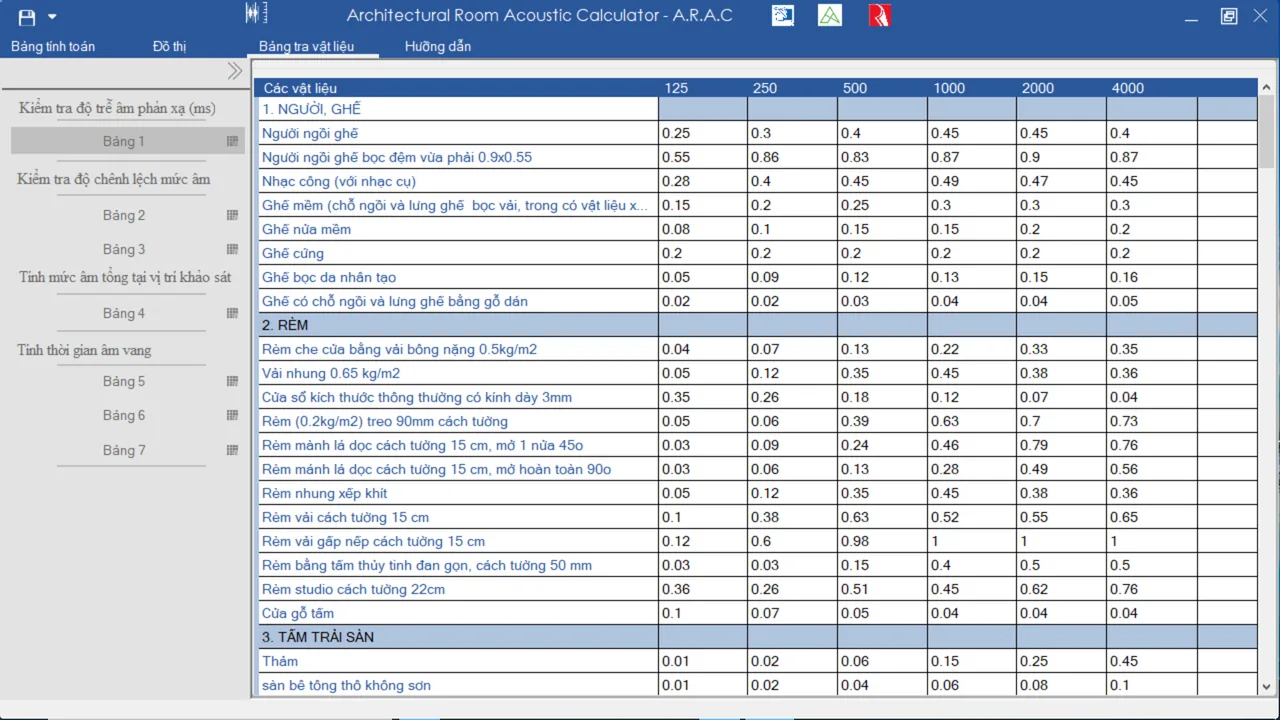
Click Bảng tra vật liệu (Material table) to look up absorption coefficients at 125, 250, 500, 1000, 2000 and 4000 Hz. Materials are grouped into people and seats, curtains, floor coverings, openings and slots, reflectors and absorbers.
2. Table 1: reflection delay
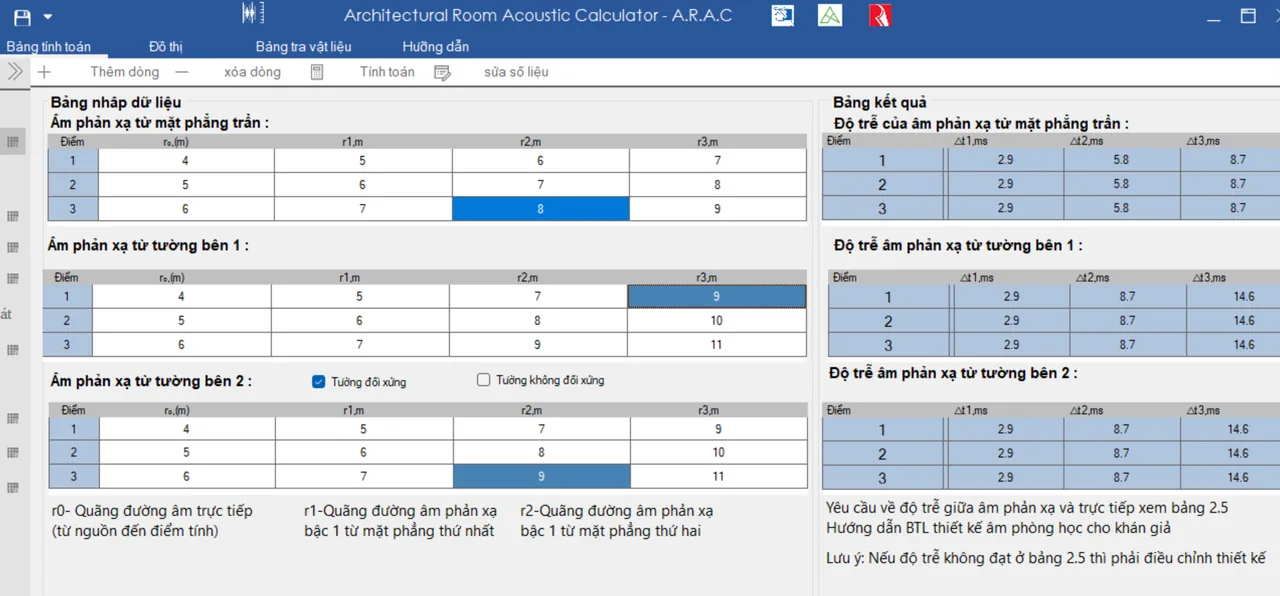
- Enter the path lengths measured on the plan and section of the auditorium. Press Tab to jump to the next cell.
- The r₀ you enter for ceiling reflections is copied to the side-wall tables automatically.
- If the side walls are symmetrical, tick Tường đối xứng (Symmetrical walls): side wall 2 takes the results of side wall 1.
- After typing in the last cell, click another cell so the value is accepted, then click Tính toán.
Click Tiếp (Next) at the bottom to move on to table 2a.
3. Tables 2a, 2b, 2c: reflected level from ceiling and side walls
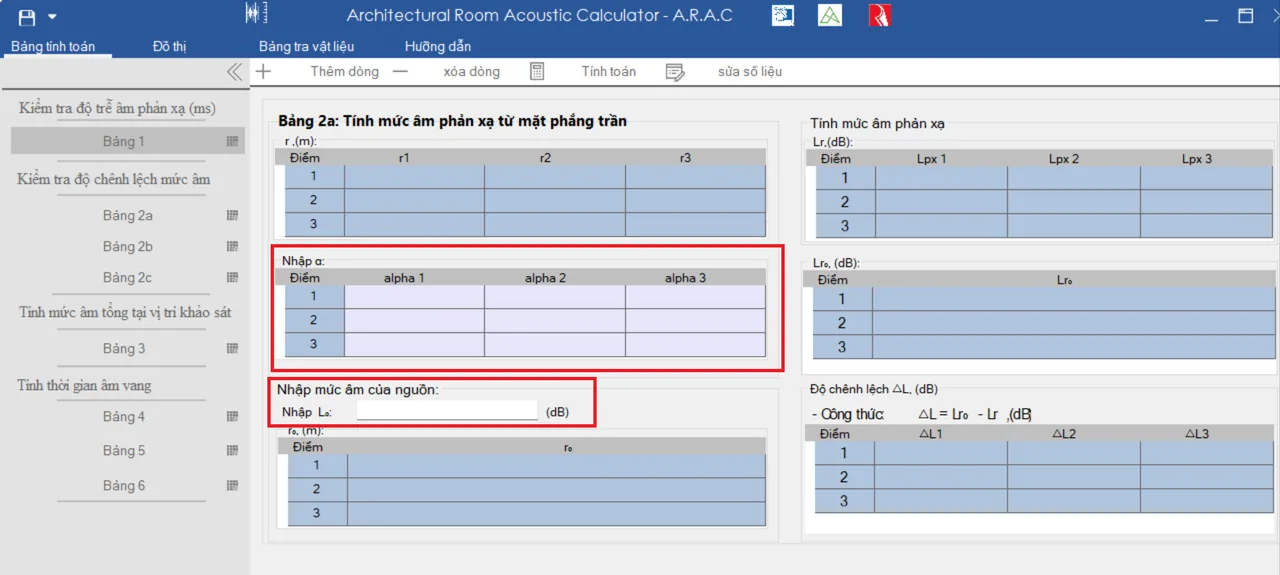
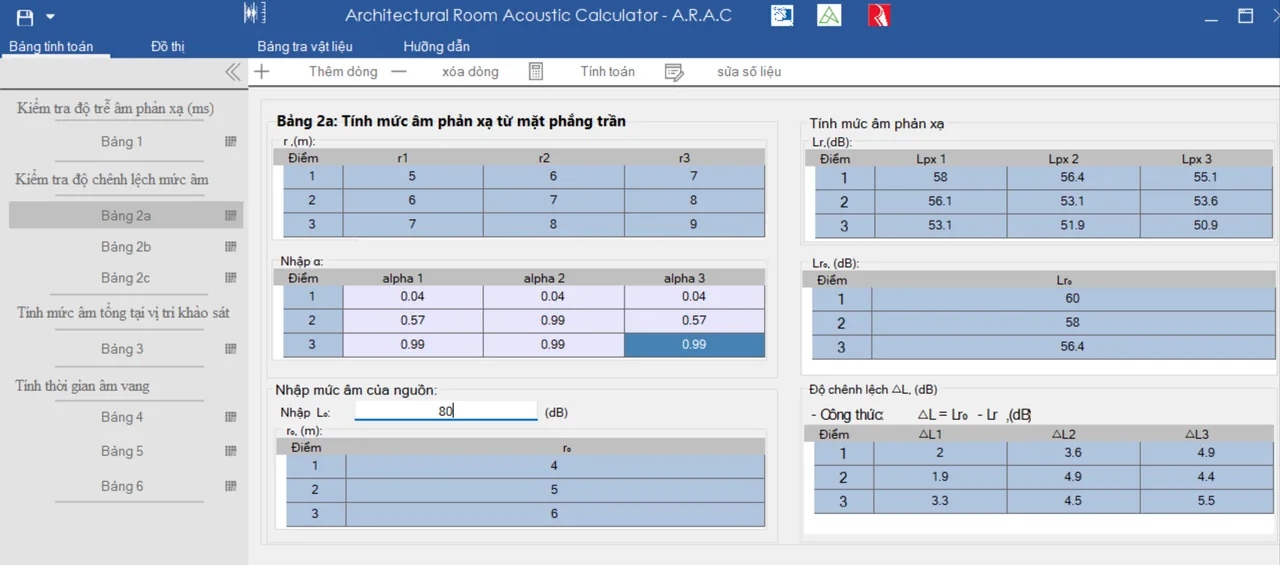
Table 2a covers the ceiling, 2b side wall 1 and 2c side wall 2. You do not enter r₀, r₁, r₂ or r₃ again; they come from table 1.
- Click an absorption cell α to open the coefficient table and pick a value, or type the number in.
- Enter the direct level of the source L₀ (dB), then click Tính toán.
4. Table 3: total sound level at the listening points
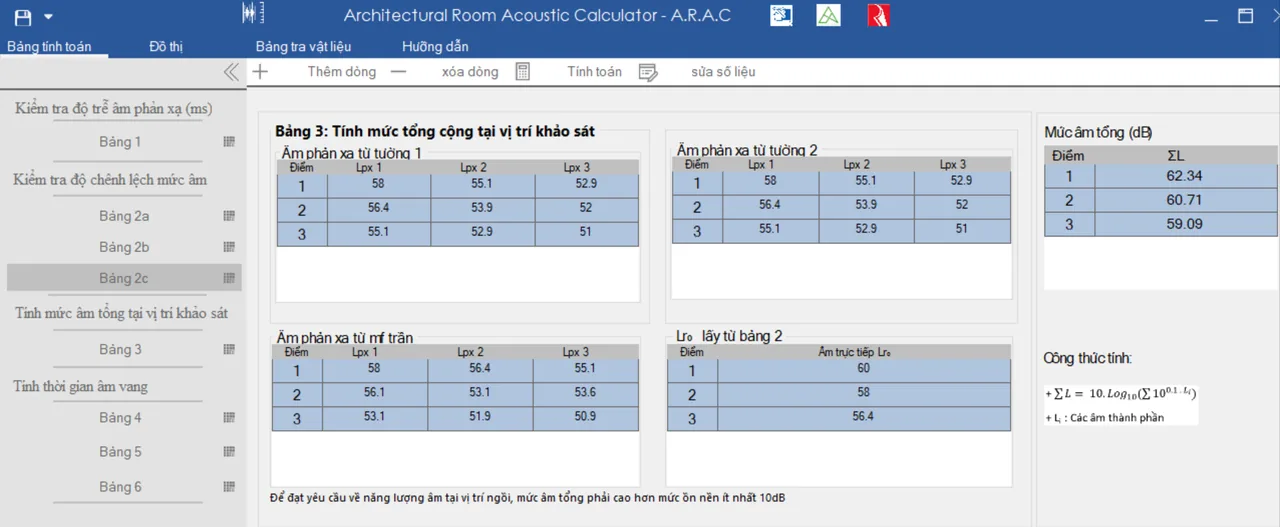
Click Tính toán to load the data from tables 1 and 2. ARAC adds direct sound to the ceiling and wall reflections to give the total level ΣL at each point. To give the seats enough sound energy, the total level must exceed background noise by at least 10 dB.
5. Table 4: inputs for reverberation time
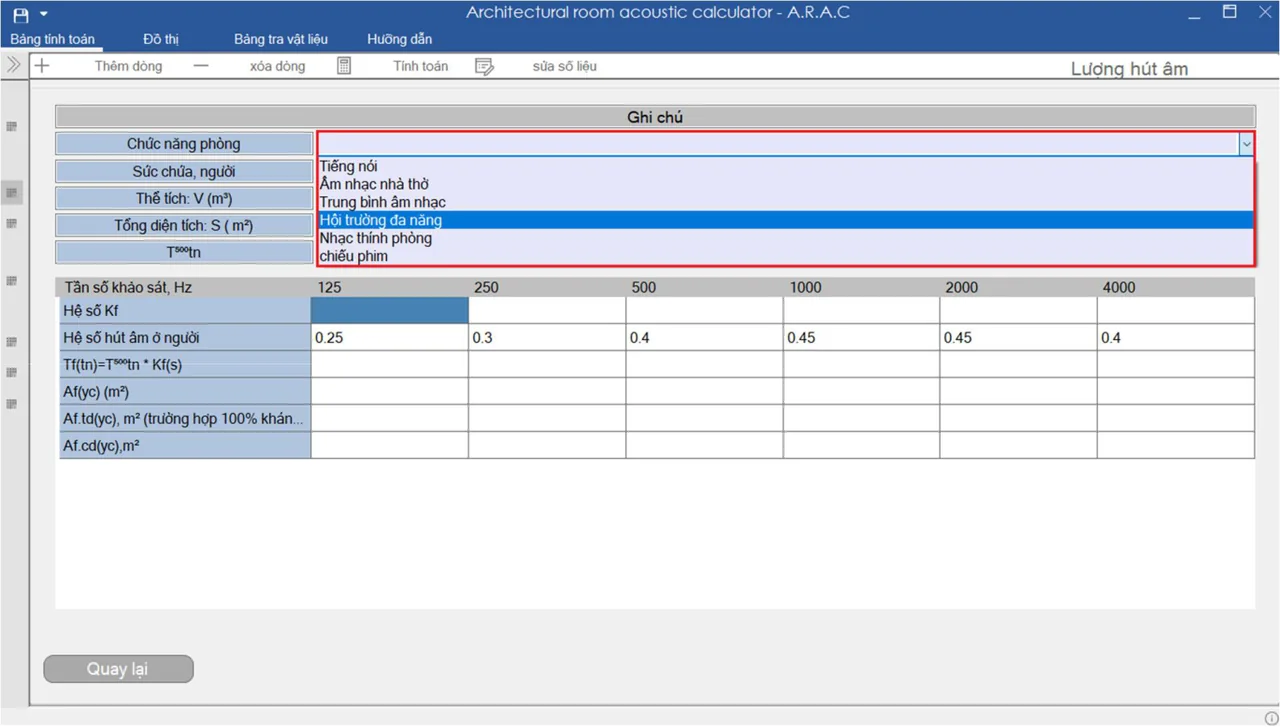
- Pick the room function: speech, church music, general music, multi-purpose hall, chamber music or cinema.
- Enter capacity (people), volume V (m³), total surface S (m²) and the optimum reverberation time at 500 Hz.
- Enter the factor Kf at 125 Hz and 250 Hz, then click Tính toán.
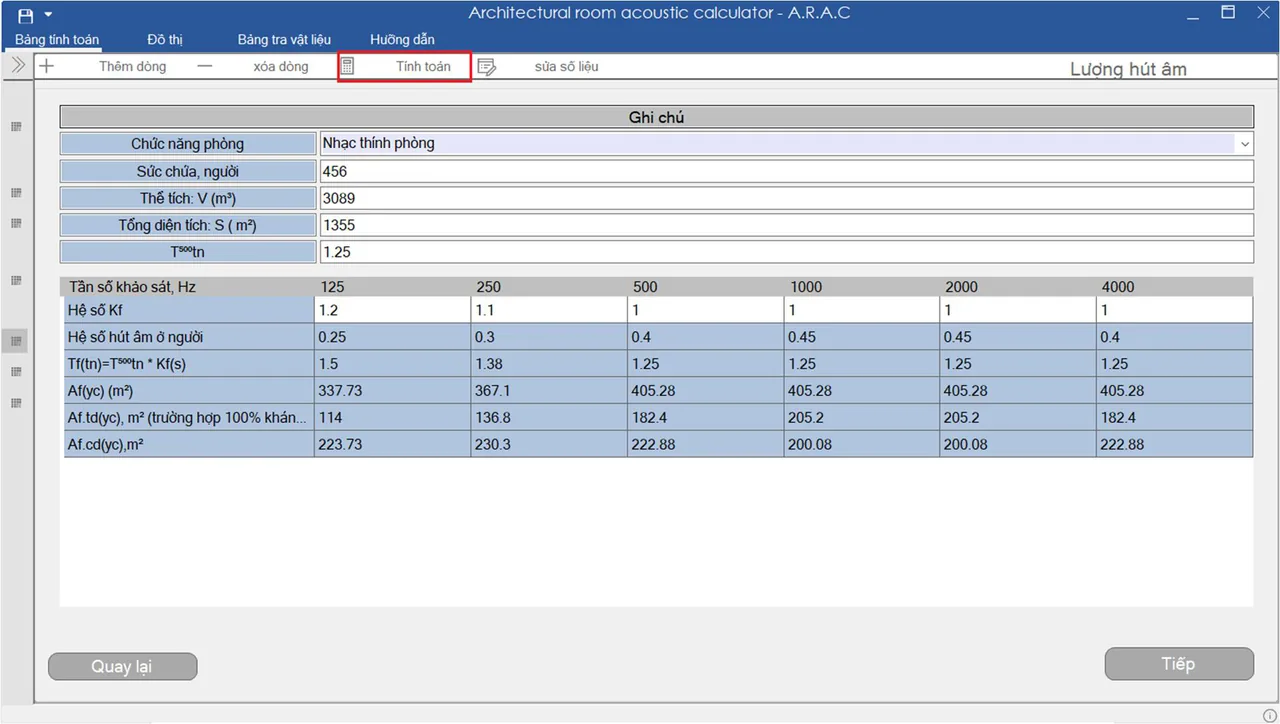
6. Table 5: room surfaces and materials
- Click Thêm dòng, then Chọn bề mặt (Choose surface) to pick a material from the library.
- For a material that is not listed, choose Khác (Other) and enter its coefficients yourself.
- Enter the area Si of each material, the occupied seats and the empty seats.
- Choose the air absorption factor at 2000 Hz and 4000 Hz, then click Tính toán.
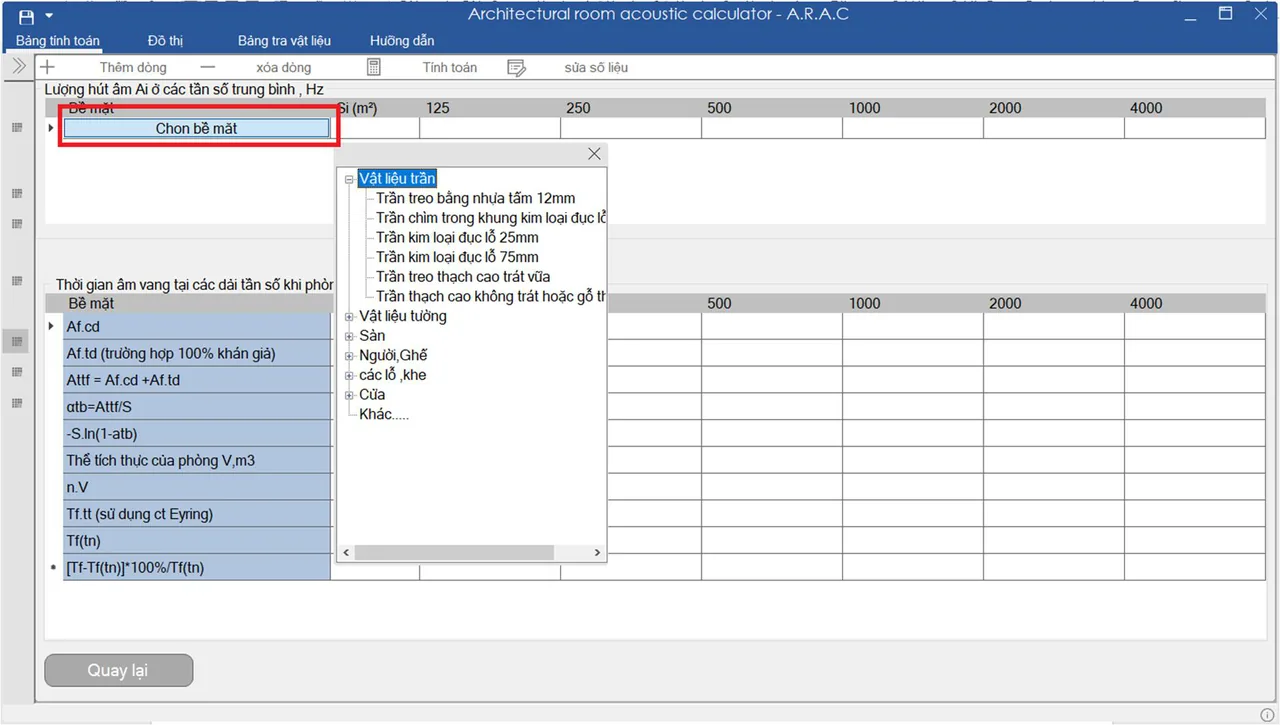
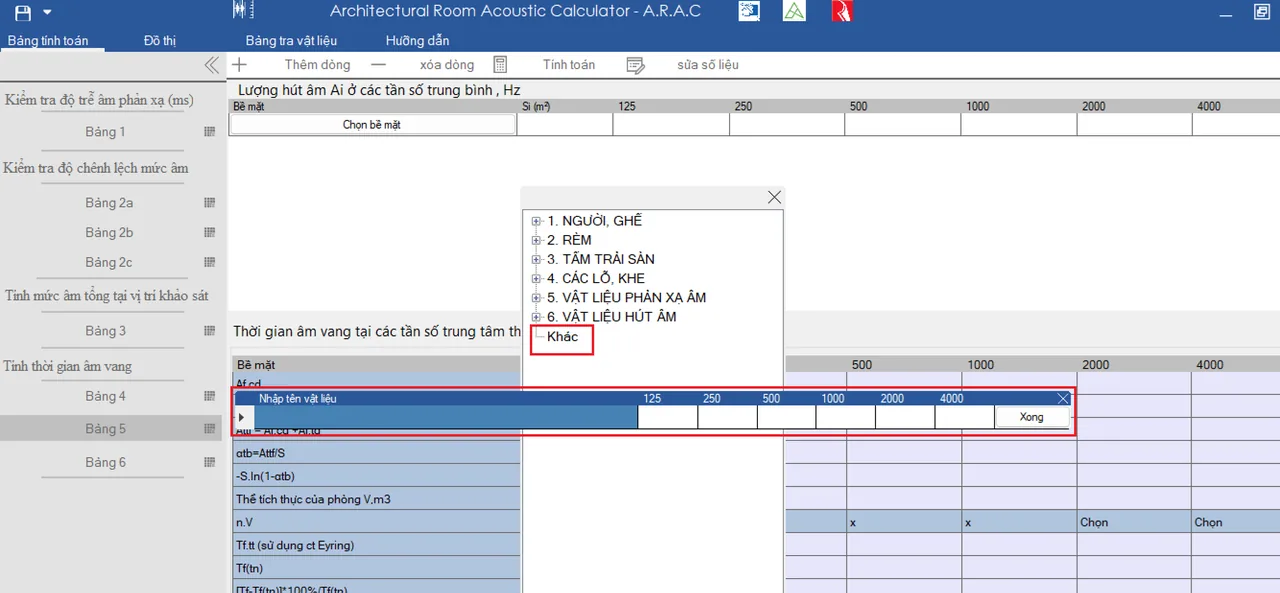
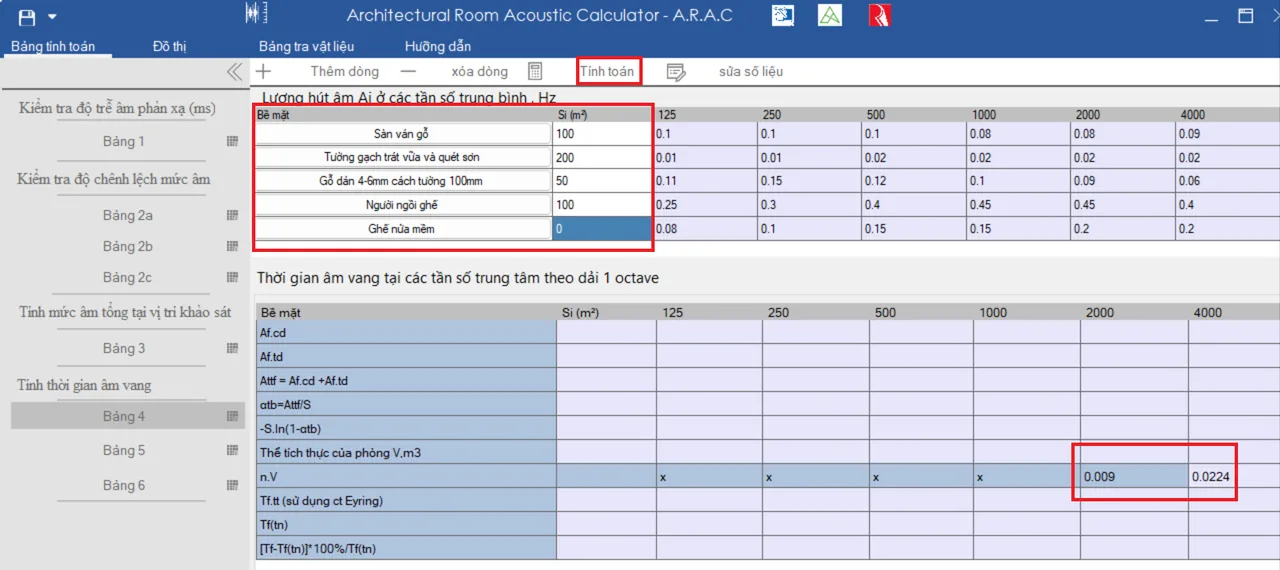
Once calculated, open the chart to compare actual and optimum reverberation time. If it misses, click Quay lại (Back) to table 5 and change areas, add or remove materials until the calculated T is within 10% of the optimum. Then click Tiếp to go to table 6.
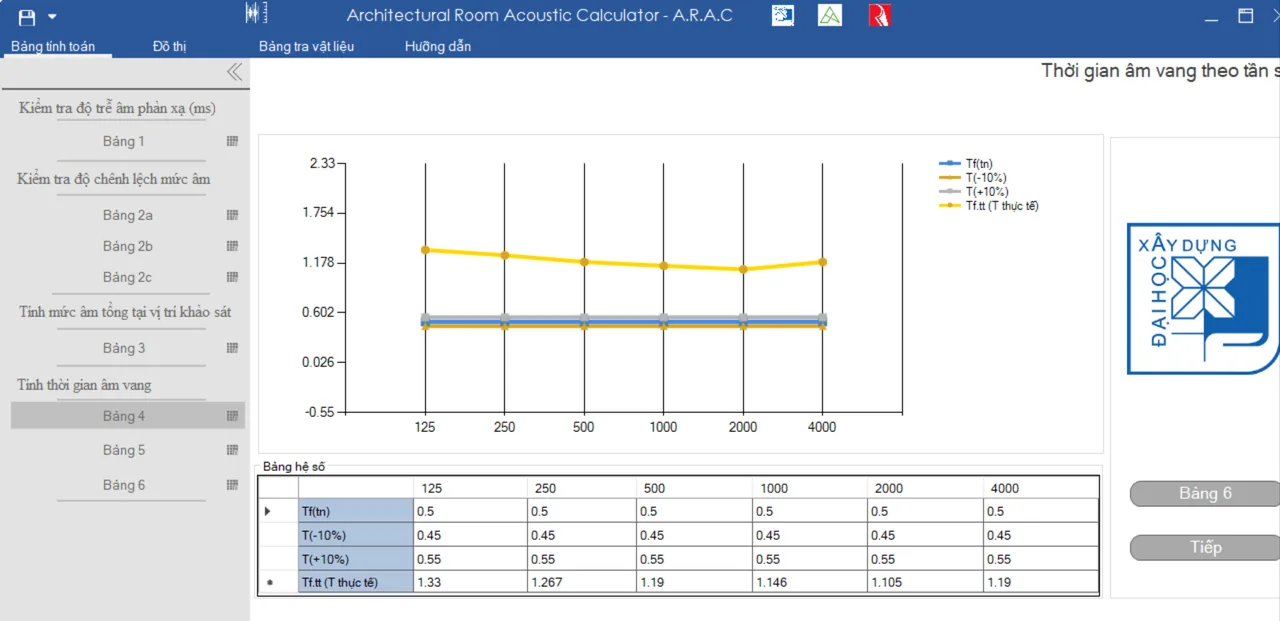
7. Table 6: reverberation vs occupancy
Click Tính toán to get the 500 Hz reverberation time with the room 0%, 50%, 75% and 100% occupied, then open the chart.
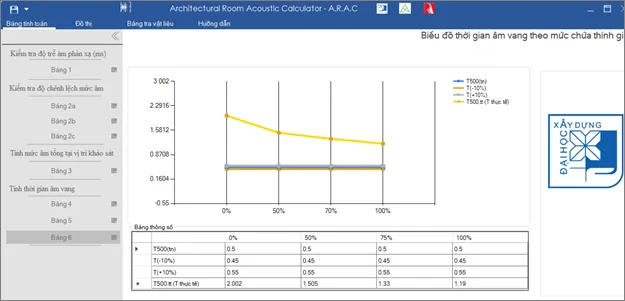
Every chart you create is kept under the Đồ thị (Charts) tab.
8. Saving and reopening a project
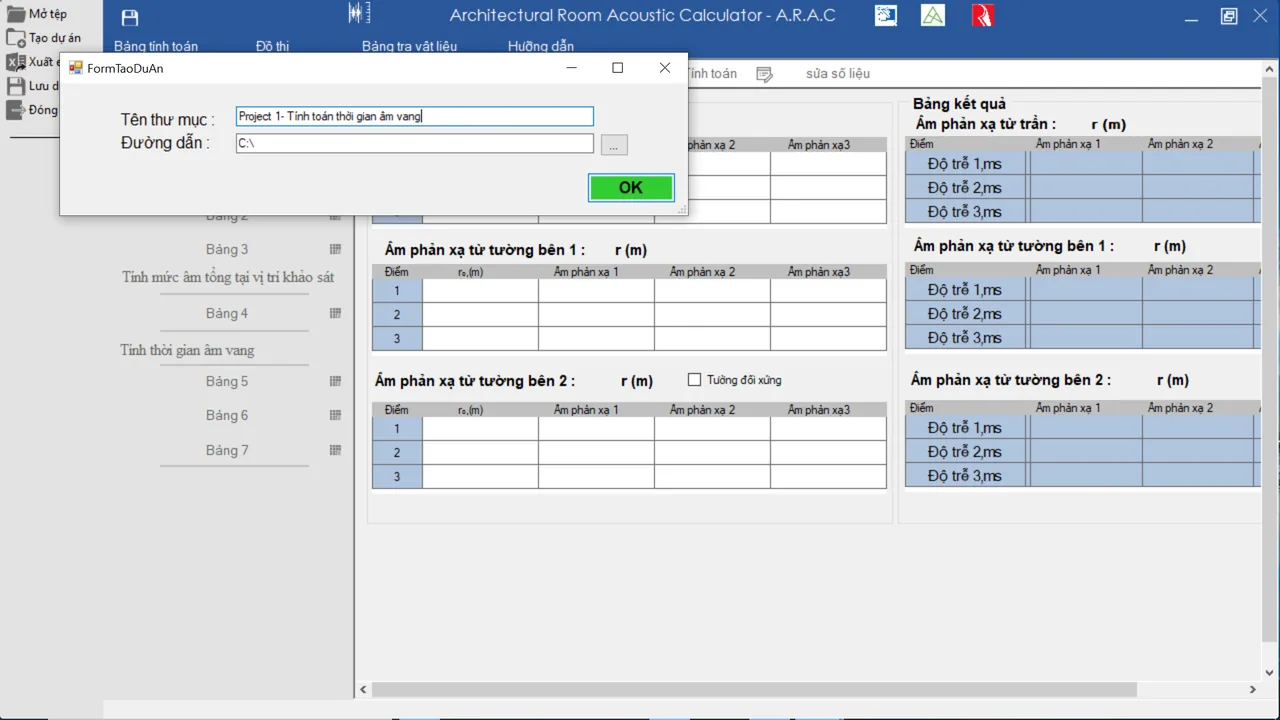
Click the save icon at the top left, choose Tạo dự án (New project) and give a name and folder to store every table as one project. To continue later, click the same icon, choose Mở tệp (Open) and point to the saved folder. The menu also offers Xuất Excel (Export to Excel).
Symbols used in the tables
| Symbol | Unit | Meaning |
|---|---|---|
| r₀ | m | Path length of direct sound |
| r | m | Path length of reflected sound |
| L₀ | dB | Direct level of the source |
| Lr0 | dB | Level at the listening point from direct sound |
| Lr | dB | Level at the listening point from reflected sound |
| ΔL | dB | Difference between reflected and direct level |
| ΣL | dB | Total level at the listening point |
| α | – | Absorption coefficient of a material |
| αtb | – | Average absorption coefficient |
| n | – | Air absorption factor |
| S | m² | Area |
| A | m² | Sound absorption |
| Af,cđ | m² | Fixed absorption at frequency f |
| Af,tt | m² | Actual absorption at frequency f |
| Af,yc | m² | Required absorption at frequency f |
| T | s | Reverberation time |
| Tf,tn | s | Optimum reverberation time at frequency f |
| Tf,tt | s | Actual reverberation time at frequency f |
Download and install ARAC
- Version
- ARAC 1.5.0
- File
- ARAC 1.5.0.rar, 14.7 MB, containing an .msi installer
- System
- Windows; the installer refuses Windows XP and older
- Licence
- Free for study
Extract the .rar with WinRAR or 7-Zip, run ARAC 1.5.0.msi and follow the installer.
Need calculation software of your own?
SDC builds bespoke software — from small plugins to complete management systems.