
Upcoming intakes 1 classes open
- Starts 29/10/2026Đào tạo công ty Ms ProjectOnline
Schedule 20h00-22h00 thứ 3,5,7
Venue Online - Toàn Quốc
Tuition fee Students 1,200,000 VND·Engineers 1,750,000 VND·6 sessions
About this course
This MS Project course is RDSIC's six-session construction scheduling programme, taught in class and online.
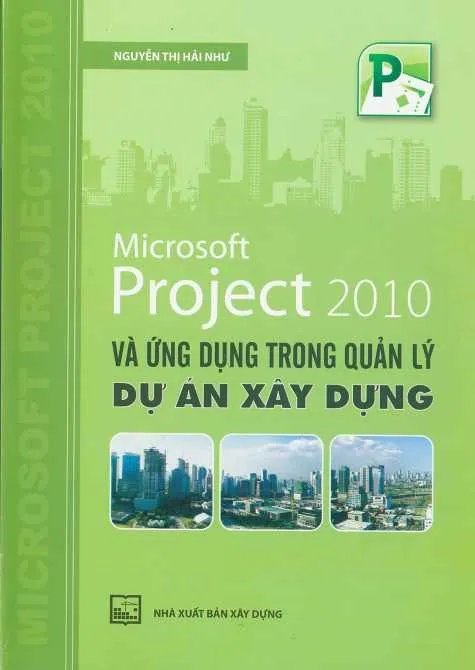
This classroom-based MS Project course at the RDSIC training centre of the Institute of Information Technology in Civil Engineering — Hanoi University of Civil Engineering (HUCE) is built around the daily work of planning engineers on construction sites. The lead instructors co-authored a reference book on applying Microsoft Project to construction project management, published by the Construction Publishing House.
Across six sessions you assemble one complete schedule dossier: master the interface and base settings, enter tasks, resources and costs for a specific building, then practise the skills most people lack — recording site progress, comparing against the baseline and using earned-value indicators to tell whether the project is ahead or behind, over or under budget.
What you will learn
- Turn a raw activity list into a structured programme with summary groups, milestones, links and constraints.
- Configure dedicated calendars for the project, for individual tasks and for each resource type.
- Plan labour, plant and material demand over time, detect allocation conflicts and rebalance them.
- Build the budget inside the schedule using resource rates and fixed costs, rolled up by stage.
- Record actual site data and measure variance against the original plan.
- Judge project health with earned-value indicators and issue well-formatted schedule reports in print or PDF.
Who should enrol
- Planning officers and site-office engineers working for contractors.
- Contract managers and project management board staff who verify and monitor schedules.
- Team leaders coordinating many parallel activities who need a professional planning tool.
- Final-year construction students who want scheduling skills before graduation.
Detailed syllabus
1. Software overview and workspace preparation
- Problems MS Project solves in reporting and running construction works
- What changed from the 2010 generation onward in interface and workflow
- Everyday commands, rarely used tools and the functions to master thoroughly
- Installation notes and preparing your computer for the course
2. Time configuration and the calendar system
- Default program settings and how they affect a project file
- Time-related defaults to check before scheduling
- Entering the project start and finish
- Building new working calendars and task calendars; an introduction to resource calendars
- Managing created calendars: duplicate, rename, delete
3. Building the task list
- Task categories, planning mode (Task Mode) and task type choices
- Entering tasks with durations; milestones, recurring tasks and summary tasks
- Constraint types, how to declare them, and task deadlines
- Effort-driven scheduling and splitting tasks into segments
- Editing the list, creating and changing links, revising durations
4. Mobilising and balancing resources
- Resource types on a construction project
- Creating the resource sheet and adjusting working time for work resources
- Setting availability periods and maximum units per resource
- Assigning resources, checking and correcting assignments
- Usage views for the selected task, resource graphs and levelling
5. Project costs, schedule formatting and publishing
- Resource pricing: standard and overtime rates, accrual timing and time-phased rate tables
- Choosing rate tables per task; fixed costs and cost accrual for tasks
- Reviewing costs project-wide, per task and per resource
- Sorting with the Sort dialog and filtering data
- Reports, tables and printing
- Presentation: fonts, displayed fields, timeline, localised headings, gridlines, headers and logos; PDF export with signature
6. Updating actuals and evaluating performance
- Finding the critical path and critical activities
- Saving the baseline before execution starts
- Entering actual start and finish dates, elapsed durations and percent complete
- Updating actual work, resource usage and incurred costs
- Comparing plan against reality in the Tracking Gantt view
- Earned Value Management: EV status, EAC forecasting and in-software analysis
- Final assignment: complete and submit a schedule dossier for assessment
Learning format
Six sessions planning and tracking construction schedules in Microsoft Project, from the task list through to owner reporting. Three ways to attend, one syllabus and one set of sample schedules:
- Online — The instructor teaches live on Microsoft Teams to a fixed timetable, not through recorded video. You build the schedule on your own machine and submit files during the session; get one dependency wrong and the critical path comes out wrong with it — the sort of error that only shows when somebody opens the file. Every session is recorded.
- On campus — Evening classes in Hanoi and Ho Chi Minh City, opening on a regular intake schedule. The instructors helped write the reference book on Microsoft Project for construction project management published by the Construction Publishing House, so the discussion beyond the notes tends to go straight to site situations.
- At your company — The instructor comes to your offices, builds the schedule for the job you are actually running and settles a reporting format shared between the site team and head office. Session count and fees follow the size of the group.
Syllabus, practice files and the value of the certificate are identical across the three formats; what differs is how you meet the instructor, and the fee — see the table at the top of this page.
Class photos and videos
Certificate of completion
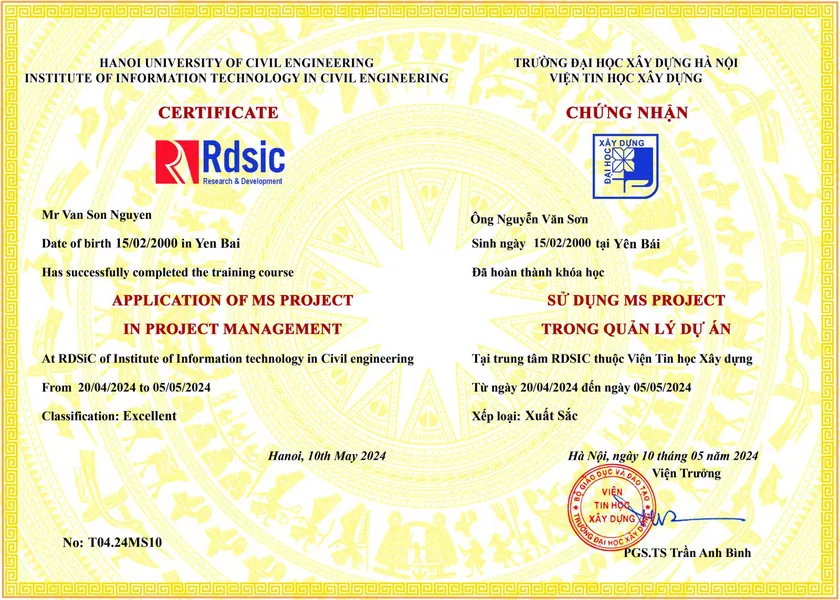
Passing the end-of-course assessment earns a completion certificate from the Institute of Information Technology in Civil Engineering — Hanoi University of Civil Engineering. Call 0989 427 809 or 0914 388 841 for details and enrolment support.
Promotions and discounts
Group tuition discount — applied to every group member and the group leader:
| Group size | Group members | Group leader |
|---|---|---|
| 2 people | 5% off | 10% off |
| 3 people | 5% off | 15% off |
| 4 people | 5% off | 20% off |
| 5 people | 10% off | 25% off |
| 7 people | 10% off | 30% off |
| 10 people | 10% off | 50% off |
| 15 people | 10% off | 70% off |
| 20 people | 20% off | 100% off |
Note: this discount cannot be combined with any other promotion.
Discounts for taking multiple courses at RDSIC
- Take two courses in parallel and get 10% off the tuition of each course.
- Your second course at RDSIC is 10% off.
Deferral policy
- In-person courses: deferral of up to one year from the date the centre confirms it.
- Online courses: no deferral; as an exception, students who have attended less than 50% of the course may be granted a deferral of up to one year.
Related courses
- GIS-BIM-AI Integration Course (Online)
- Navisworks Manage Course
- Revit Structure for Construction Course
- Revit Family Creation Course
Browse the full list at Construction Courses.